Connecting from lemon.cy
- Sign in to Lemon and go to Settings → Integrations. In the Connected apps card, find Hospitable and press Connect.
- Lemon sends you to Hospitable. Sign in there if asked and approve Lemon's access. There is no API key or token to copy: Hospitable hands the access to Lemon directly, and you can revoke it from Hospitable at any time.
- Hospitable returns you to Lemon. Lemon lists the properties it can see in your Hospitable account. Nothing is imported until you tick it. A property that already exists in Lemon is offered for linking rather than created twice; linking switches that property's iCal feeds off so one calendar drives it.
- Tick the three short agreements (terms, privacy, and the note that Lemon schedules cleaning from what Hospitable sends) and choose what happens to the cleans that come in: hold everything for review and release in bulk, create them but contact nobody until you activate each one, or go live immediately. Lemon suggests holding for review when you bring over more than a handful of checkouts, and you can change the mode later in Settings.
- Press start. The import runs as a resumable job with visible progress and schedules a clean for every upcoming checkout, using each property's own time zone and check-out time.
Connecting from Hospitable's Apps marketplace
- In Hospitable, open Apps, find Lemon and press Get started. Hospitable asks you to approve Lemon's access.
- You land on lemon.cy with "Approved in Hospitable, one step left". Sign in to Lemon, or create an account if you are new; the approval is kept for you meanwhile.
- Lemon finishes the connection and takes you to the same property selection as step 3 above.
Connecting with the iCal link instead
If you would rather not approve the direct connection, every Hospitable property has an Export calendar link that carries the reservations from all of its channels (Airbnb, Booking.com, Vrbo and direct). Paste it into Lemon and Lemon reads it every 5 minutes. Four steps, two in Hospitable and two in Lemon.
In Hospitable
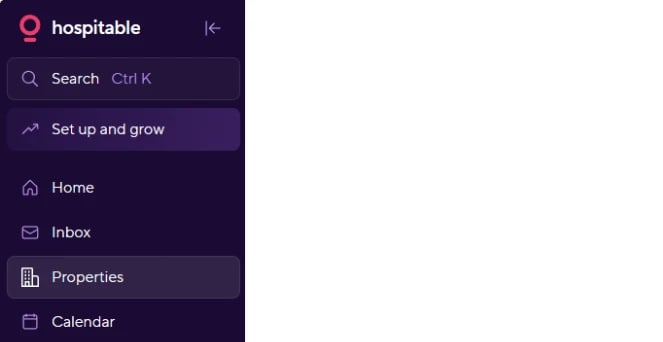
Step 1. In the left menu, open Properties.
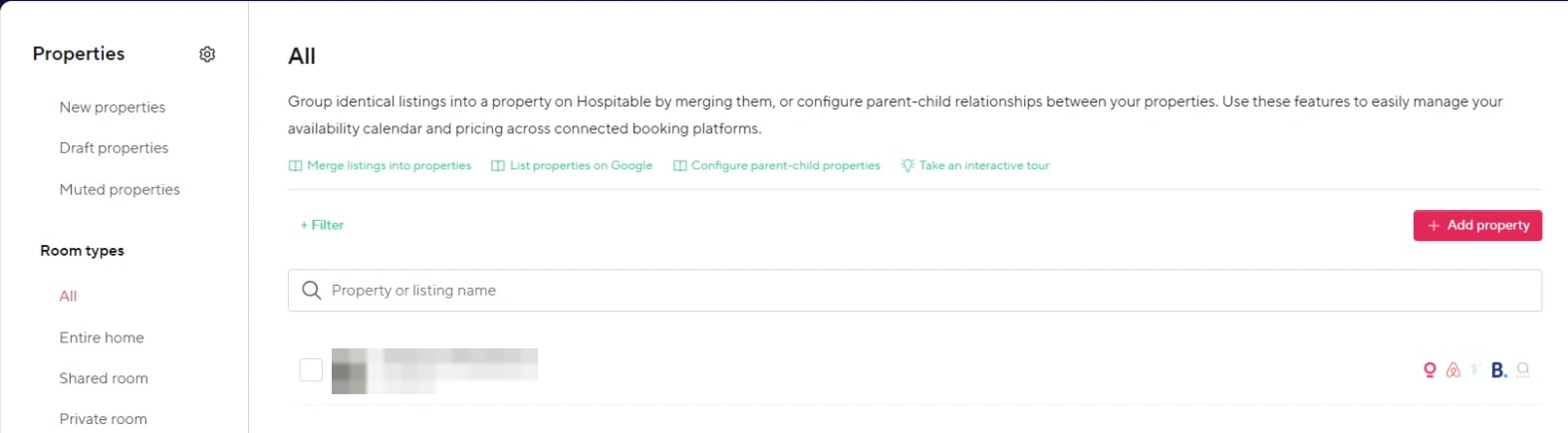
Step 2. Click the property you want Lemon to clean. A property groups the listings of one home across channels, so one link covers all of them.
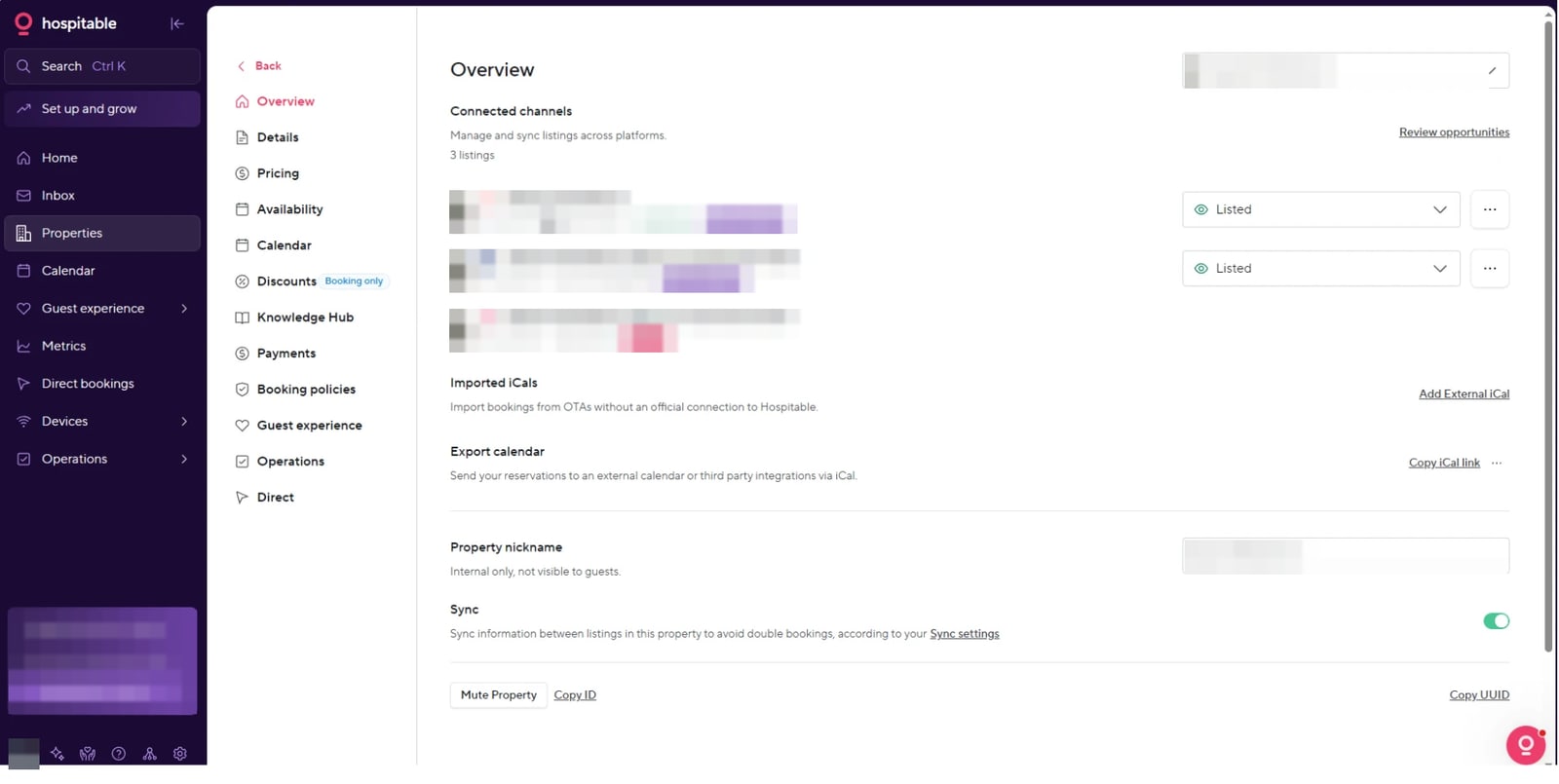
Step 3. On the property's Overview, scroll to Export calendar and press Copy iCal link on the right. The link is now on your clipboard.
In Lemon
Step 4. Open lemon.cy, go to Properties, open the property (or add it), and press Add Feed. Give the feed a name such as "Hospitable", paste the link into iCal URL, choose Hospitable (all channels) as the platform, and save. The first sync runs at once; from then on Lemon checks the link every 5 minutes and schedules a cleaning job for every checkout.
Repeat steps 2 to 4 for each property. Lemon de-duplicates stays that also arrive through an Airbnb or Booking.com link on the same property, so you can keep those or replace them with the one Hospitable link.
Which to choose
- The iCal link needs no approval and is a copy-and-paste. Changes reach Lemon on the next 5-minute check, cancellations are inferred from the stay disappearing, and Lemon waits before acting on them.
- The direct connection above hears about new, moved and cancelled reservations within seconds and knows the reservation's status. If you switch to it later, Lemon turns the property's iCal feeds off for you so the two never disagree.
After connecting
- From then on, reservation webhooks create, move and cancel cleaning jobs within seconds; a 30-minute poll catches anything a webhook missed.
- Settings → Integrations shows the connection and its properties. Reconnect from the same place if Hospitable asks for a fresh approval, for example after Lemon gains a new permission; your properties and settings are unchanged.
- Disconnect erases Lemon's access to Hospitable immediately. Your properties, bookings and cleaning jobs are kept, so reconnecting picks up where you left off.
What Lemon keeps from a reservation
Dates, status, platform, guest count and the reservation code. Guest names and contact details are dropped at ingest — Lemon schedules cleaning and does not need them. This is documented for the integration's data-processing review.
Statuses and edge cases
on holdin Hospitable covers two situations (a reservation awaiting confirmation and an inquiry-type hold). Lemon distinguishes them so a hold does not create a phantom cleaning job, and releases the job when the reservation confirms.- Cancellations are explicit events, so there is no confirmation window to wait through.
- Lemon does not write back to Hospitable. Cleaning lives in Lemon.
Planned
Importing the property's Hospitable cleaning checklist into Lemon's per-property checklist — waiting on an additional API scope.